Storage quota
Your Nextcloud administrator can set a storage quota for your account. Open your Personal settings page to see your quota and how much storage you have used.
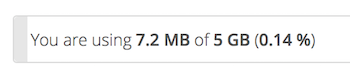
It may be helpful to understand how your quota is calculated.
Metadata such as thumbnails, temporary files, caches, and encryption keys can use disk space without counting against your user quota. Some apps store data in the database, such as the Calendar and Contacts apps. This data is not included in the file-storage quota.
When other users share files with you, the shared files normally count against the original owner’s quota. When you share a folder and allow other users or groups to upload or edit files in it, those files count against your quota. When you re-share files shared with you, the re-share normally continues to count against the original owner’s quota.
Encrypted files can use more physical storage than unencrypted files. The quota calculation uses the file size reported by Nextcloud’s storage layer.
When the Versions app is enabled, older file versions are managed separately from the normal storage quota according to the app’s retention and storage rules.
If you create a public share through a URL and allow uploads, uploaded files count against your quota.
Deleted files and the trash bin
Files and folders in your trash bin do not count against your normal storage quota. The trash bin nevertheless has its own storage limit.
For accounts with a quota, the default amount of space available to the trash bin is calculated as 50% of the account’s remaining quota space. This is calculated after the account’s active files have been taken into account; it is not 50% of the total quota.
For accounts without a quota, the default trash-bin limit is calculated using available filesystem space instead. An administrator can configure a global or per-account trash-bin size that overrides the calculated default.
Your administrator can also configure minimum and maximum trash-bin retention periods, or disable automatic expiration. See the Deleted Files section of the Administrator Manual for details.